EXIF data reveals the technical expertise behind every photo. Learn how to make it visible to your clients and to photography enthusiasts.
You have just delivered a series of studio portraits and a client asks you: “How did you get such a perfect background blur?” Or: “Which lens did you use for this shot?” Questions like these come up regularly in a photographer's work.
EXIF (Exchangeable Image File Format) data contains exactly this technical information: aperture, shutter speed, ISO sensitivity, focal length, camera and lens model. When this metadata is visible in your galleries, it answers these questions naturally.
For a professional photographer, displaying EXIF data offers several concrete benefits. Your clients see the equipment you use, which builds their confidence in your expertise. Photography enthusiasts can draw on your settings for their own shoots. And you demonstrate your technical command without having to explain every parameter.
How do you make EXIF data accessible?
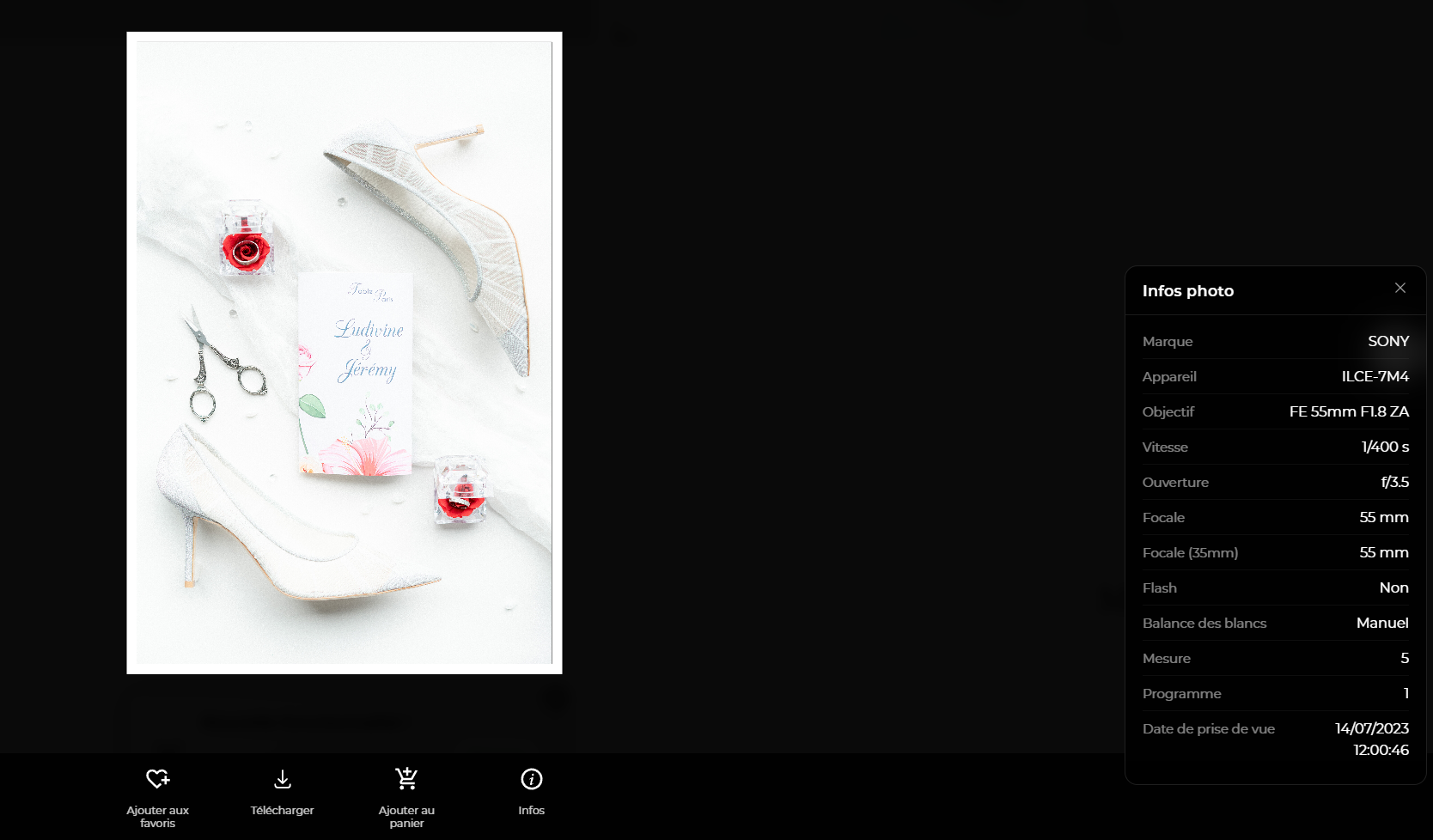
Ideally, this information is built directly into the viewing interface. When a visitor opens a photo in full screen, an “Info” button can appear in the toolbar, next to the download and favorite options.
Clicking this button opens an unobtrusive panel with all the relevant metadata: camera make and model, lens used, aperture (f/), shutter speed, ISO, focal length, flash use, and the date the photo was taken. This clear presentation lets everyone understand the technical choices behind the image.
Staying in control of what is displayed
Not every photographer wants to share their settings. Some prefer to keep an air of mystery around their technique, while others work with equipment they would rather not disclose.
That is why this feature should remain optional. In the gallery settings, a simple checkbox lets you turn the display of EXIF metadata on or off. When the option is turned off, no button appears and the data stays private.
Likewise, if some photos have no EXIF data (screenshots, heavily edited images, converted files), the system should detect this automatically and not offer information that does not exist.
Automatic metadata extraction
Most digital cameras and smartphones automatically record EXIF data in every image file. When you upload your photos to a gallery, this metadata can be extracted and stored automatically.
This extraction happens without any action on your part. You do not need to enter the technical details of each photo manually. The system reads the data already contained in your files and makes it available for display.
Added value for the client experience
Beyond the technical side, displaying EXIF data enriches your visitors' experience. A client who learns that a wedding photo was taken at ISO 1600 with an aperture of f/2.8 better understands how challenging it is to shoot in low light.
This technical transparency strengthens your professional credibility. It shows that you know your equipment and adapt your settings to each situation. It is a subtle but effective way to showcase your skills.